
Automatic DVSA & DVLA refresh
Every vehicle is re-checked against DVSA and DVLA overnight, so MOT and tax status are current when you open the app. Failed refreshes raise a notification instead of showing stale data.
UK fleet management software
Fleet Manager pulls DVSA MOT and DVLA tax data for your whole fleet automatically, keeps service, maintenance and insurance records against each vehicle, and emails the right people before anything runs out. No spreadsheet, no manual checks, no missed renewal.
03:15
Nightly compliance sweep
DVSA+DVLA
Official data sources
Roles
Admin & user access
Built around the deadlines that actually get fleets fined: MOT, vehicle tax, servicing and insurance.
Every vehicle is re-checked against DVSA and DVLA overnight, so MOT and tax status are current when you open the app. Failed refreshes raise a notification instead of showing stale data.
A full MOT timeline for each vehicle with pass and fail results, recorded defects and advisory notes, so you can see problems coming before the next test.
Mileage charts plus summary stats: average advisories per test, fail rate, average miles between tests and average miles per year.
DVLA tax status and due dates on the vehicle record, tracked next to MOT so both deadlines are visible in one place.
Store the insurance provider, policy number and renewal date per vehicle, so cover is tracked with the same rigour as MOT and tax.
Log maintenance and repairs separately from routine servicing, each with a date, cost, notes and odometer reading, and see what a vehicle really costs to keep on the road.
Dated service records with notes and odometer readings, plus uploaded invoices, photos and PDFs. Images preview in place; other files download.
Set service intervals and let Fleet Manager work out the next service due date from the vehicle's own history and mileage.
Reminders for MOT, tax and service due dates, sent to the vehicle owner, chosen team members or any custom address, at the day offsets you pick.
A notification centre inside the app, with per-user reminder settings so people control what reaches them and when.
Up to 20 photos per vehicle with a primary image and a keyboard-navigable gallery. Useful evidence for condition, damage and handover disputes.
Assign owners, group by depot or region, tag for fast filtering, and invite admins and users. Every record is company scoped by default.
Go deeper on MOT & tax reminders, MOT history & mileage, service & maintenance records, and insurance renewals.
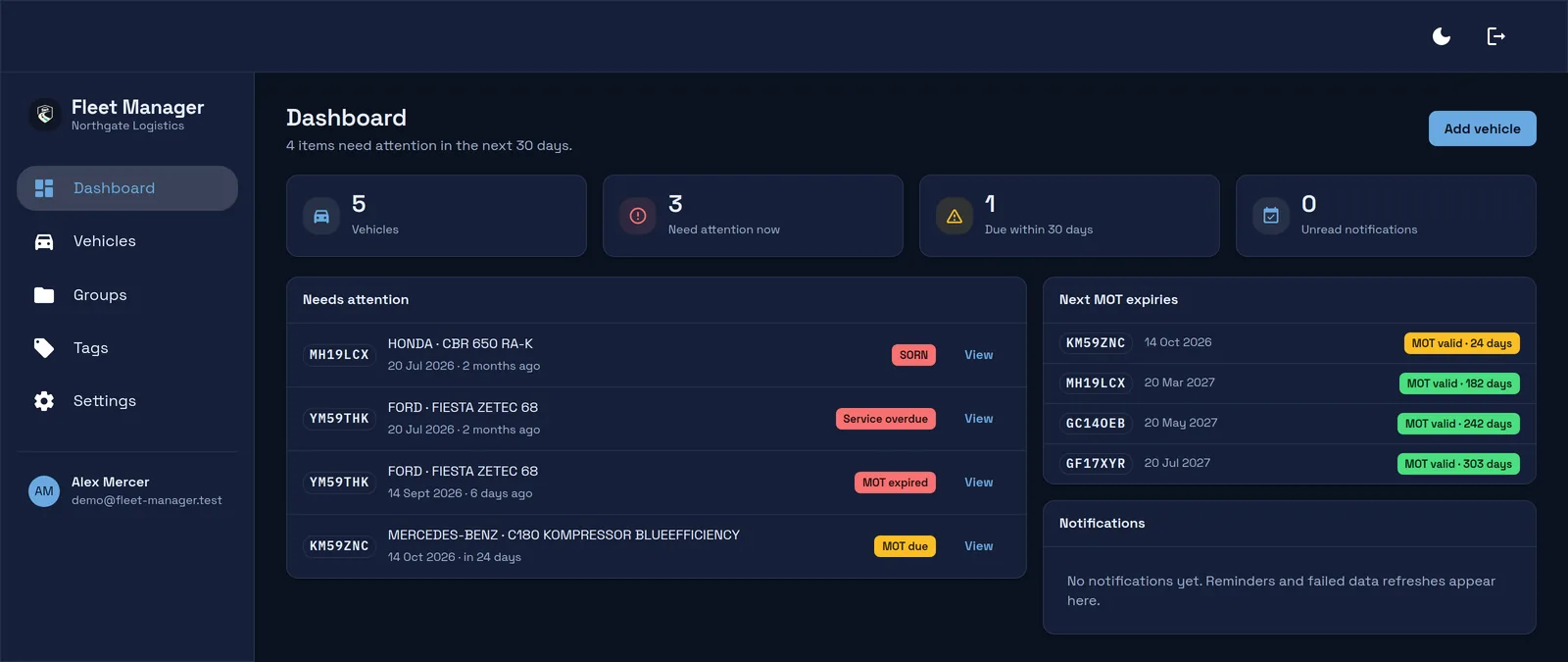
Real screens from the app, showing a five-vehicle demo fleet with one expired MOT, one MOT due within the month and one vehicle declared off the road. The dashboard above counts what is wrong now and what falls due in the next 30 days, then lists the vehicles by urgency: expired MOTs, SORN and untaxed first, with overdue servicing and upcoming insurance renewals included.
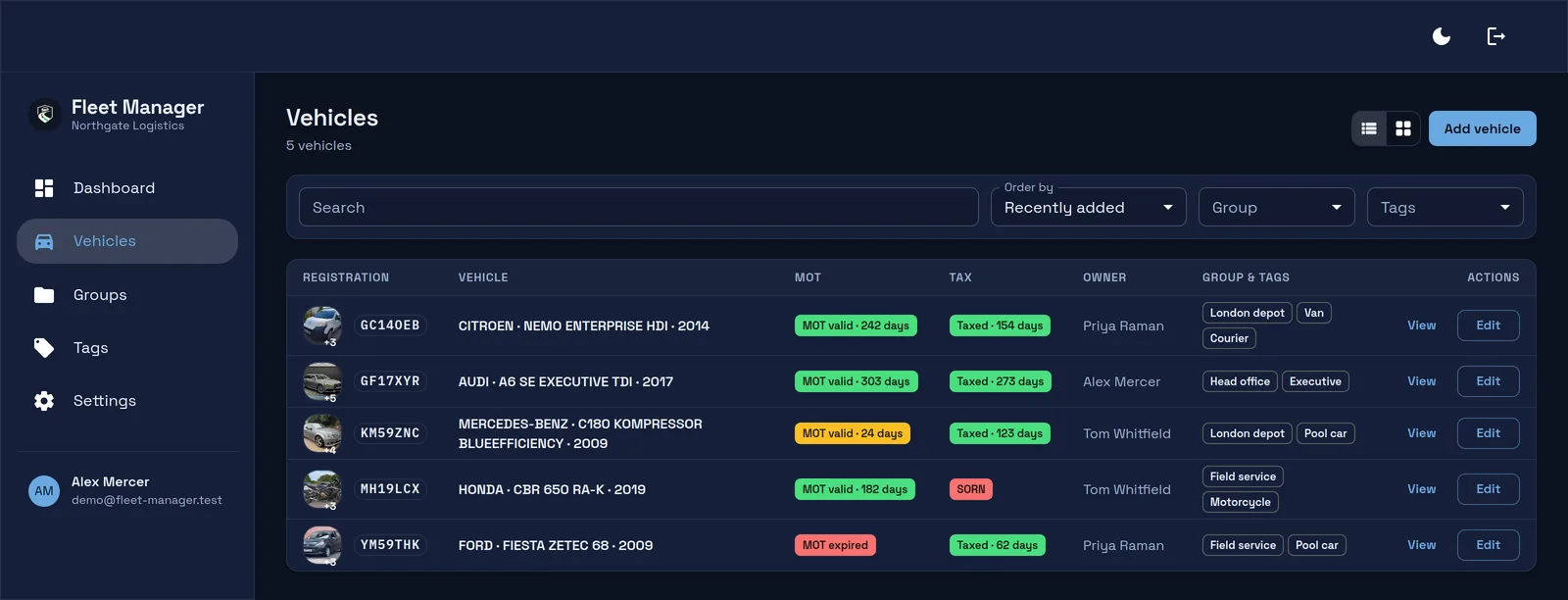
A dense table built for scanning, with MOT and vehicle tax in their own columns so you can run an eye down either one. Switch to cards whenever you prefer.
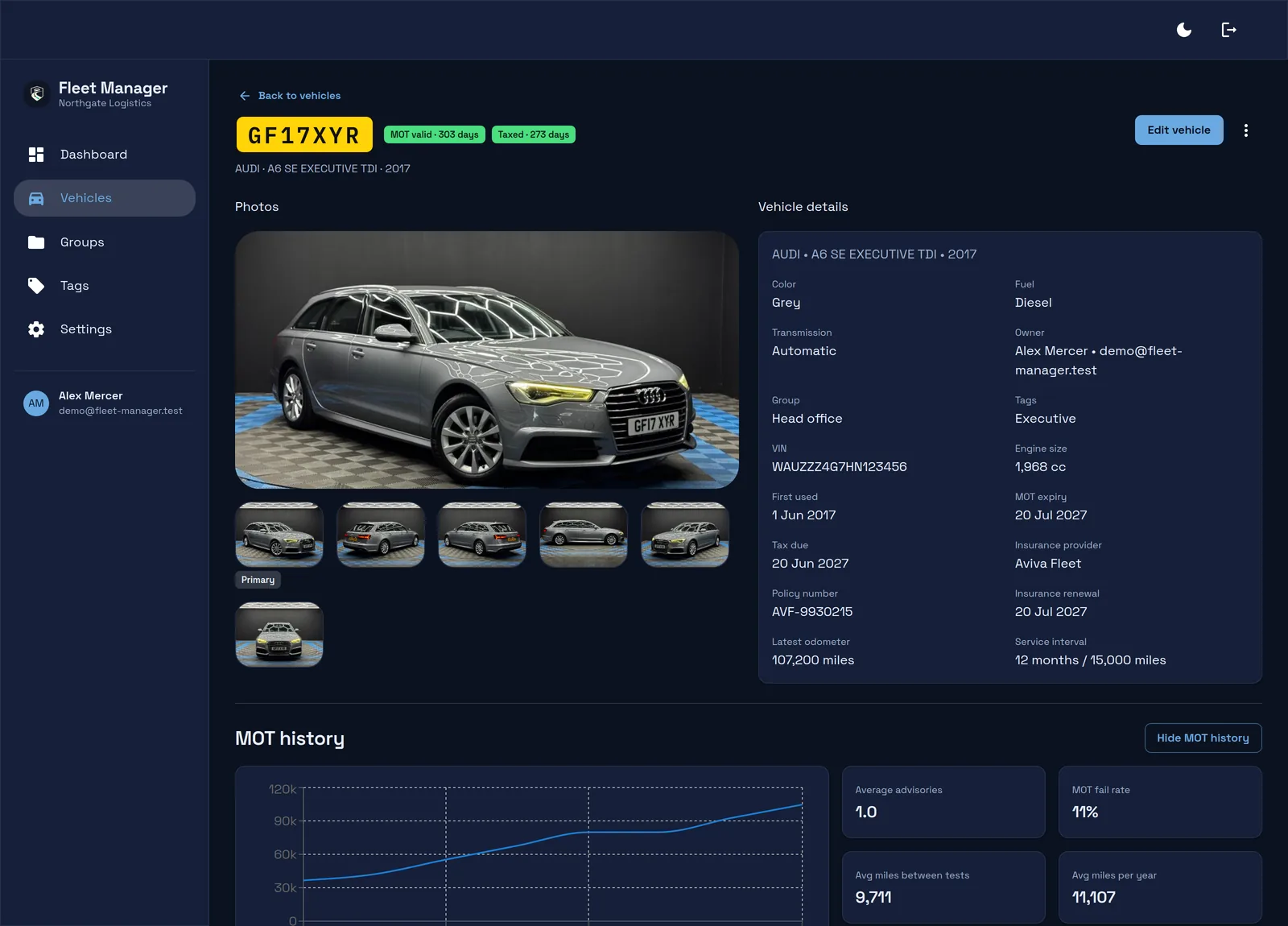
Specification, ownership, MOT and tax dates, insurance policy and renewal, service interval and photos, all on the vehicle rather than spread across a spreadsheet and an inbox.
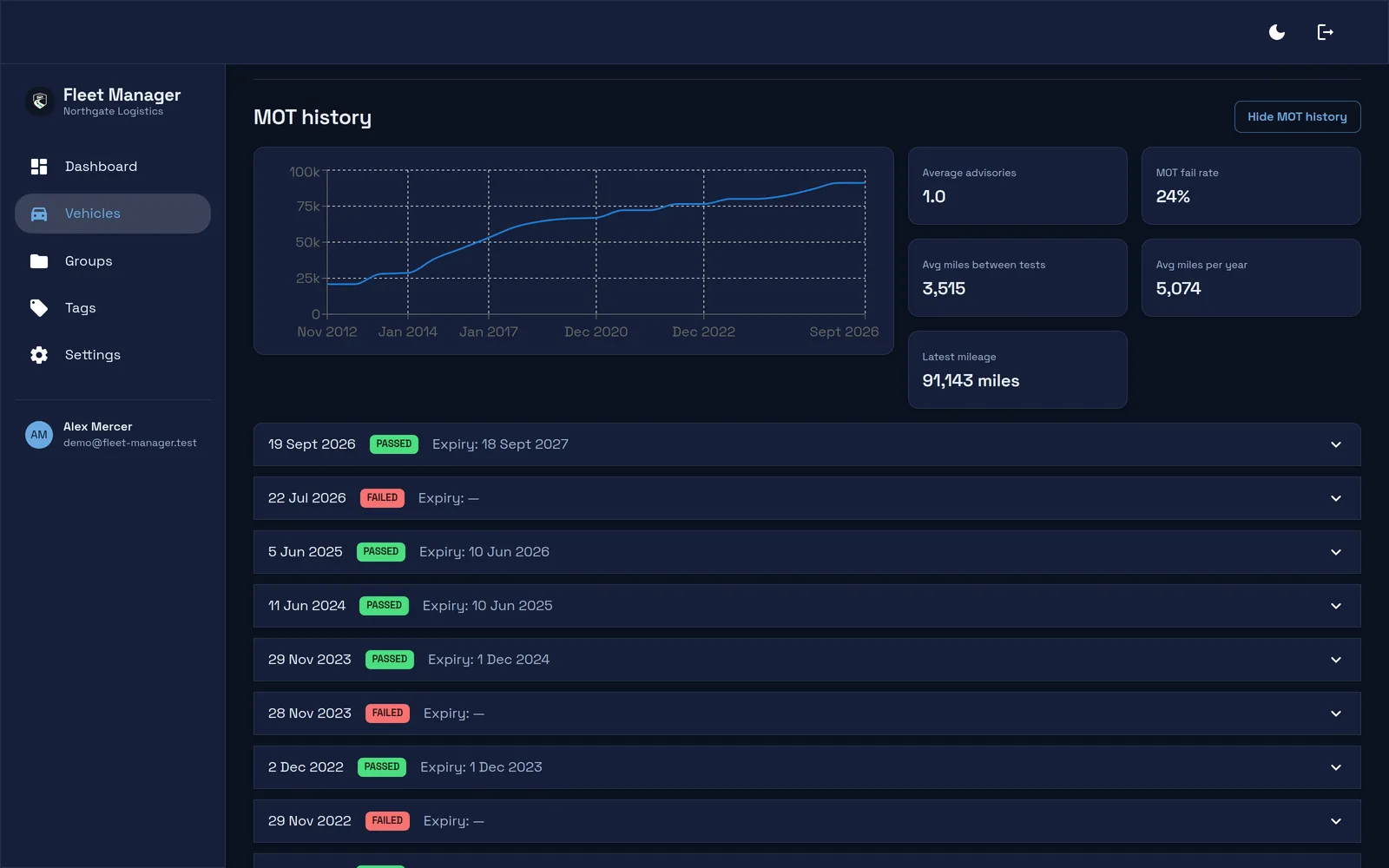
The full DVSA record, charted. Mileage over time plus the numbers that tell you whether a vehicle is worth keeping.
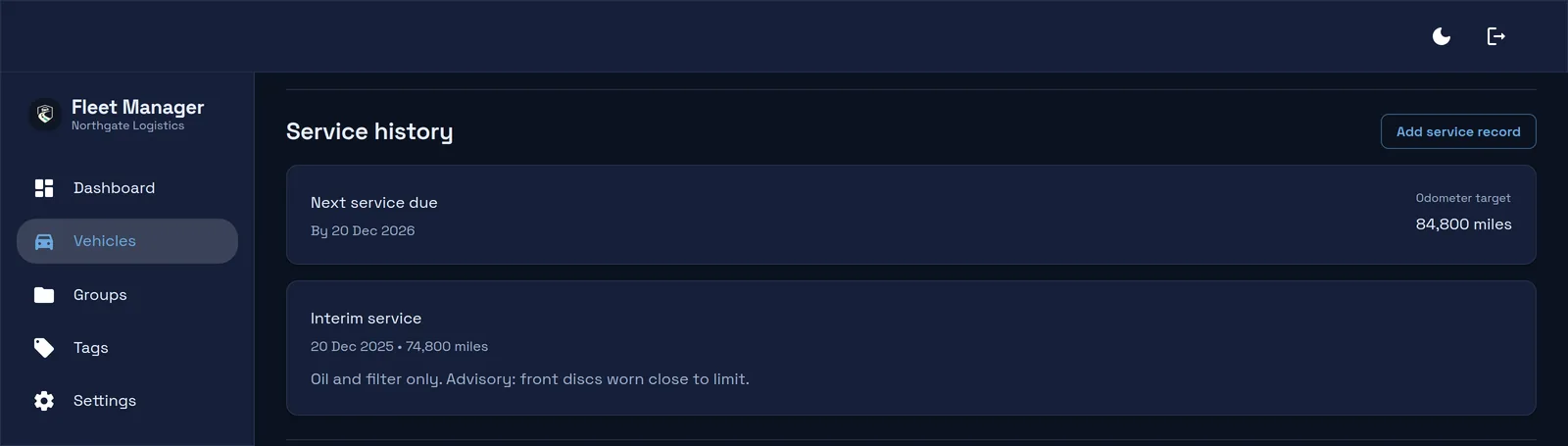
Dated records with notes, mileage and uploaded invoices, and a next-service date worked out from the vehicle's own interval and history.
Screens show a demo fleet. Vehicle photographs are stock listing images and the compliance dates are illustrative.
Most fleet tools make you press a button to find out something expired last week. Fleet Manager runs a sweep across your whole fleet at 03:15 every morning, pulling fresh MOT data from DVSA and tax status from DVLA, then sends the day's reminders at 09:00.
You can still refresh any vehicle on demand whenever you need an answer immediately.
03:15
DVSA MOT and DVLA tax data re-checked for every vehicle, without overlapping runs.
On failure
A refresh failure raises a notification rather than silently leaving old data on screen.
09:00
MOT, tax and service reminders reach owners and stakeholders at your chosen day offsets.
Configure recipients per vehicle: the assigned owner, additional team members, or custom addresses such as a shared operations inbox. When MOT and tax dates land close together, Fleet Manager groups them so one email covers the vehicle rather than three.
Email reminders, plus an in-app notification centre for the people who live in the app.
Choose the exact day offsets before each due date that suit how your operation plans work.
MOT, vehicle tax and service due dates tracked in one consistent workflow per vehicle.
Straight answers for teams evaluating Fleet Manager.
Yes. Fleet Manager refreshes your vehicles against DVSA and DVLA automatically every night, so MOT and tax status stay current without anyone touching them. You can also refresh any vehicle on demand, and results are cached to keep the app fast.
MOT status, test history, defects and advisories come from the DVSA MOT history service. Vehicle tax status and due dates come from DVLA. Fleet Manager keeps a cached copy so the interface stays fast and your history survives between refreshes.
Failures are surfaced, not hidden. If a vehicle cannot be refreshed, Fleet Manager raises a notification so you know the status on screen may be stale instead of trusting old data.
Yes. Each vehicle stores its insurance provider, policy number and renewal date alongside MOT and tax, so every recurring deadline for that vehicle sits on one record.
Yes. Maintenance and repair logs are kept separately from routine service records, each with a date, cost, notes and an optional odometer reading, so you can see what a vehicle has actually cost you.
Yes. Assign an existing team member, or enter a custom owner name and email address when the owner is not a system user. Reminders can be sent to either.
Recipients are configurable per vehicle: the assigned owner, other team members, and custom addresses such as a shared operations inbox. You choose how many days before the due date each reminder is sent.
Photos, PDFs and other supporting documents. Images open in a preview and other file types download, so invoices and inspection sheets stay attached to the vehicle they belong to.
Yes. Fleet Manager is company scoped with admin and user roles. Every vehicle, record and upload is locked to your company, so your team shares one source of truth and nothing leaks between companies.
Tell us how many vehicles you run and what currently goes wrong. We will show you how Fleet Manager handles it, or tell you honestly if it is not the right fit yet.
MOT, tax, service, maintenance and insurance in a single workspace that checks itself every night.